Hands-on tested | Updated April 2026
If you’re confused between high DPI vs low DPI mouse settings, this comparison will help you decide. Getting your mouse DPI settings for gaming right is one of the most impactful adjustments you can make — it affects your sensitivity, accuracy, and competitive advantage in every single session. Whether you’re chasing the best DPI for FPS, optimising for MOBA map clicks, or just trying to stop missing shots you should be hitting, the answer isn’t as simple as copying a pro player’s number.
Based on hands-on testing across multiple sensitivity setups and game genres, here’s what actually matters in 2026. We’ve broken down DPI, eDPI, and real gaming performance across every major genre so you can dial in your setup with confidence. Here’s everything you need to make the right call.
⚔️High DPI vs Low DPI: Quick Comparison
Before diving in, here’s how high DPI and low DPI stack up at a glance — the full breakdown follows in every section below.
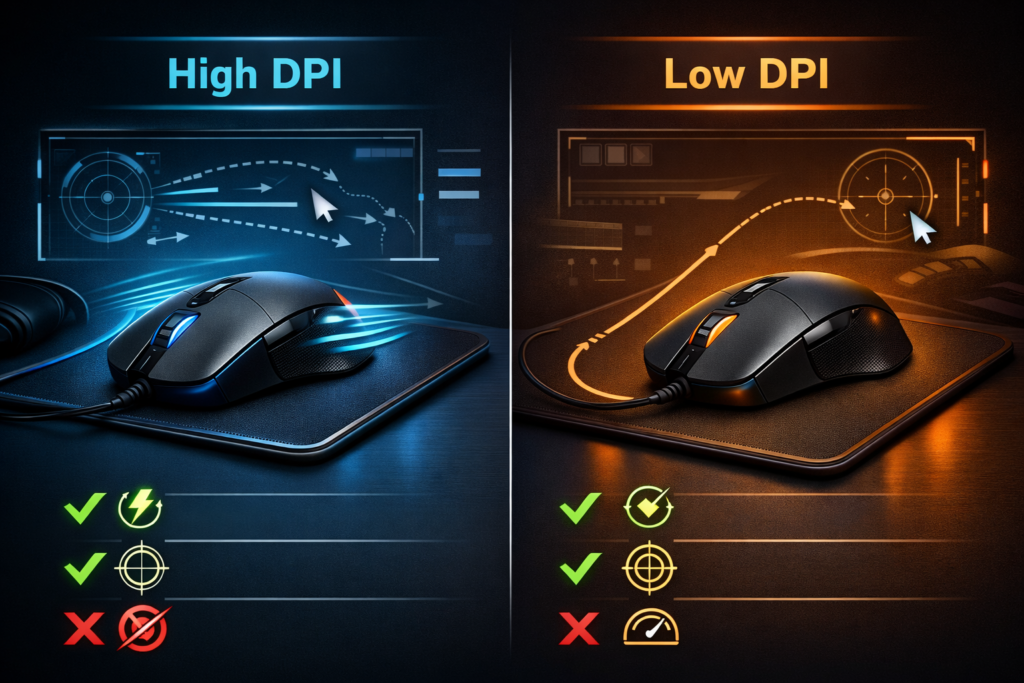
| Feature | High DPI | Low DPI |
| Sensitivity | High — fast turns | Low — precise aim |
| Accuracy | Good for fast moves | Best for precise aim |
| eDPI Range | 1600–3200+ | 400–800 |
| Best For | Fast-paced FPS | Sniping / RTS / MOBA |
| Pro Usage | Rare at extremes | Standard in esports |
| Mouse Movement | Small movements | Large arm sweeps |
| Learning Curve | Easy to start | Takes adjustment |
| Error Margin | Higher at a distance | Lower at a distance |
Which column matches how you actually play? Keep reading — the table is just the surface.
🖱️ Sensitivity & eDPI Explained
Before you touch a single setting, you need to understand three terms — and most guides only explain one of them properly. Mouse DPI settings for gaming only make sense once you know exactly what DPI, in-game sensitivity, and eDPI each control and how they interact with each other.
What Is DPI?
DPI stands for Dots Per Inch. It measures how far your cursor moves on screen for every inch your mouse physically travels across your mousepad. The relationship is direct and simple — higher DPI means more on-screen movement from less physical mouse movement, and lower DPI means the opposite.
At 400 DPI, moving your mouse one inch moves the cursor 400 pixels. At 1600 DPI, that same one-inch movement moves it 1600 pixels. Same physical movement, four times the on-screen distance. This is the entire mechanical foundation of the high vs low DPI decision.
What Is In-Game Sensitivity?
In-game sensitivity is a separate setting that lives inside the game itself — completely independent from your mouse’s DPI setting. It acts as a multiplier on top of whatever DPI your mouse is already set to. A high in-game sensitivity combined with a low DPI can produce the same cursor speed as a low in-game sensitivity combined with a high DPI.
This is why the DPI number on your mouse alone tells you almost nothing useful about how a player actually aims. Both settings working together determine the real result, which is where eDPI comes in.
What Is eDPI — And Why Does It Matter?
eDPI — effective DPI — is calculated by multiplying your DPI by your in-game sensitivity. It’s the only number that lets you compare gaming mouse sensitivity settings fairly across different players, regardless of what hardware or in-game settings they use individually.
A player using 400 DPI at 2.0 sensitivity has an eDPI of 800. A player using 800 DPI at 1.0 sensitivity also has an eDPI of 800 — they are moving the same effective distance with every mouse movement. The numbers look different; the real-world aim speed is identical.
This is why eDPI explained matters properly so much for competitive players. It lets you copy a pro player’s exact feel and movement speed without needing to know whether they set their sensitivity in-game or via their mouse software.
Stop focusing on DPI alone — eDPI is the number that actually tells you how a player aims.
🎯 FPS Gaming Performance
If you play any form of competitive FPS and you’re using high DPI, there’s a strong chance it’s actively working against your accuracy — and the data from professional playbacks this up completely. Understanding the best DPI for FPS isn’t about preference; it’s about how human arm mechanics interact with mouse precision at different sensitivity ranges.
Why Most FPS Pros Use Low DPI
The vast majority of professional FPS players in Valorant, CS2, and similar titles use DPI settings between 400 and 800. This isn’t a tradition or sponsorship habit — it’s the result of competitive players finding what actually works under the pressure of ranked and tournament play.
Low DPI forces larger physical mouse movements to achieve the same on-screen result. That forces arm aiming — moving from the shoulder and elbow rather than flicking from the wrist. Arm aiming is mechanically more stable, more consistent over extended sessions, and more precise when tracking targets at long range. Small wrist flicks at high DPI introduce micro-tremor errors — tiny hand shake movements — that compound into significant aim inconsistency when you’re trying to hit a head-sized target at 50 metres.
When High DPI Makes Sense in FPS
High DPI isn’t useless in FPS contexts — it’s just situational. Close-range scenarios that demand fast 180-degree turns or rapid snap reactions can benefit from a higher DPI range where small physical movements translate to large on-screen angles. Players with smaller desks or genuinely limited mousepad space may also find that high DPI is a practical necessity rather than a choice. Games with fast time-to-kill mechanics — where reaction speed matters significantly more than surgical precision — also tolerate higher DPI more comfortably than precision-heavy titles.
Real FPS Examples
The pro data makes the low DPI pattern clear across every major title:
- Valorant: Most professional players sit between 200–400 eDPI — a range that prioritises crosshair placement and controlled tracking over fast reaction flicks.
- CS2: A similar eDPI range dominates, with arm aiming being the overwhelmingly standard technique across the top ranks and tournament play.
- Warzone: Slightly higher eDPI is acceptable here due to faster overall movement mechanics and closer average engagement ranges compared to CS2.
If you’re missing shots at range, lowering your DPI is almost always the first adjustment worth making.
🗺️ MOBA & RTS Performance
The entire DPI conversation shifts when you move from first-person to top-down games — and what works for a CS2 player will actively slow down a League of Legends player. Mouse DPI settings for gaming are not one-size-fits-all, and MOBA and RTS titles have fundamentally different cursor demands.
MOBA games like League of Legends and Dota 2 use a top-down perspective where you’re clicking map positions, directing unit movement, and landing skill shots on a 2D plane. You’re not tracking a moving target in 3D space — you’re clicking locations. Cursor precision still matters, but the requirement shifts from micro-tremor control toward cursor speed and map navigation fluency.
RTS games like StarCraft II take this further. You’re managing armies, switching between base and battlefield, rapidly clicking across a large map in real time. Cursor speed and the ability to cover the full screen quickly are more valuable than the pinpoint precision that a low eDPI provides for FPS play.
MOBA Recommendation
For MOBA titles, 800–1200 DPI is the practical sweet spot. It’s fast enough for rapid map clicks and camera panning, while still precise enough for skill shot targeting that requires cursor placement accuracy on moving enemies. Going below this range will make map navigation feel sluggish and reduce your efficiency with camera movement.
RTS Recommendation
RTS players benefit from sitting in the 1000–1600 DPI range. Large map navigation and the need to rapidly tab between different locations on screen genuinely benefit from faster cursor movement across the full display. The precision demands of StarCraft II army control are better served by speed than by the fine-grained accuracy that FPS players prioritise.
“MOBA and RTS players have genuinely different needs from FPS players — copying a CS2 pro’s DPI for your League of Legends sessions will actively hurt your performance.”
⚡ Accuracy vs Speed
Every DPI decision is fundamentally a trade-off between speed and precision — and understanding where that trade-off lands in your specific game is the only way to set up your mouse correctly. This is the core of the high vs low DPI debate, stripped down to its actual mechanism.
High DPI prioritises speed. Less physical movement achieves the same on-screen result, which means faster target acquisition in close-range situations and faster camera coverage in strategy games. The cost is control — particularly at a distance, where small imprecisions in hand movement translate to proportionally larger cursor errors on screen.
Low DPI prioritises accuracy. Larger physical movements give you finer control over exactly where your cursor lands, because the relationship between hand movement and on-screen result is less amplified. The cost is speed — covering large on-screen distances requires more physical mouse travel, which demands more desk space and a larger mousepad.
The Muscle Memory Factor
Changing DPI disrupts muscle memory — the trained movement distances your arm and wrist have developed over hundreds or thousands of hours of play. Your brain has built a precise internal map of how much arm movement equals how much on-screen distance. Change the DPI, and that entire map becomes inaccurate overnight.
This is why professional players rarely change their gaming mouse sensitivity mid-season. Consistency matters more than chasing a theoretically optimal number — a slightly suboptimal setting played consistently will always outperform a perfect setting played inconsistently while your muscle memory rebuilds.
The practical advice here is direct: pick a setting and commit to it for at least 2–4 weeks before forming any opinion on whether it’s working. Your performance will dip during the adjustment, and that dip is not a signal to change course.
Finding Your Ideal eDPI
If you’re starting from scratch or making a deliberate change, use these as your starting points rather than random experimentation:
- FPS players: Begin at 800 eDPI and adjust from there based on whether you feel more limited by reaction speed or aiming precision.
- MOBA players: Start at 1000 eDPI — comfortable for map clicks while still allowing skill shot accuracy.
- RTS players: Start at 1200 eDPI — faster cursor coverage for large-map navigation and rapid army management.
Adjust in 10% increments rather than large jumps. Dramatic changes make it impossible to isolate what’s actually improving or getting worse in your aim.
The best DPI setting isn’t the one pros use — it’s the one you can aim consistently with after two weeks of deliberate practice.
🖥️ Mouse & Mousepad Recommendations
Your DPI setting only performs as well as the hardware running it, and both your mouse sensor and mousepad surface affect how accurately your chosen DPI translates into real aim. Here are four products that cover every type of player in this comparison.
1. Best Mouse for Low DPI — Logitech G Pro X Superlight 2 (~$160)
- DPI Range: 100–32,000
- Best for: Competitive FPS players who want the lightest, most precise sensor available for low DPI arm aiming. At under 60g, it removes all physical resistance from large arm sweeps, and the HERO 2 sensor performs flawlessly at 400–800 DPI with zero smoothing or acceleration.
2. Best Budget Mouse for Any DPI — Razer DeathAdder V3 (~$90)
- DPI Range: 100–30,000
- Best for: Gamers who want a premium sensor at a mid-range price point. The Focus Pro optical sensor tracks accurately across all DPI ranges, making this a confident recommendation whether you’re committing to low DPI FPS play or higher DPI MOBA navigation.
3. Best Mousepad for Low DPI — SteelSeries QcK Heavy XXL (~$40)
- Size: 900×300mm
- Best for: Low DPI players who need a large surface area for full arm sweeps without running out of pad mid-movement. The thick base prevents sliding, and the cloth surface provides consistent friction for controlled tracking across the full arm range.
4. Best Mousepad for High DPI — Logitech G440 Hard Pad (~$30)
- Size: 340×280mm
- Best for: High DPI players who need a fast, controlled surface for precise wrist movements. The hard surface reduces friction significantly, allowing fast cursor movement with minimal physical effort — ideal for the small, rapid movements that high DPI play demands.
Prices verified from major retailers as of April 2026 — check current listings, as stock and pricing may vary.
🎮 Real Gaming Experience
Three real scenarios — here’s how different DPI setups actually play out in practice. Which one matches your current setup?
Competitive FPS — Ranked Valorant Session
You’re sitting at a large mousepad, 400 DPI, armed with two weeks of arm-aiming practice behind you. The crosshair placement is deliberate and controlled — shots at range land with a consistency that wrist flicking at 1600 DPI never delivered. Spray control feels manageable because the large physical movement required to track a spray pattern actually gives you mechanical feedback through the motion. The adjustment period was genuinely frustrating for the first week. By week two, the precision gains are impossible to ignore — and going back to high DPI would now feel uncontrolled.
Casual FPS — Warzone Squad Session
Medium DPI at 800, moderate in-game sensitivity — an 800 eDPI setup that sits comfortably between precision and reaction speed. Close-range encounters feel responsive without tipping into uncontrolled; mid-range accuracy holds up without requiring the full arm-aiming discipline of a low eDPI competitive setup. This is the practical sweet spot for players who want real performance without committing to a complete sensitivity overhaul and relearning process.
MOBA — League of Legends Ranked Game
Higher DPI at 1000–1200 — map clicks land immediately, camera movement flows across the map without friction, and skill shots still feel precise enough to be reliable. Running low DPI in this context would make map navigation feel frustratingly slow, creating delays between intention and cursor position that compound across a 35-minute match. The faster cursor speed here isn’t a compromise — it’s exactly what this genre demands.
“Your game determines your DPI — not the other way around. Set your sensitivity to match what your genre actually demands.”
👍 Pros & Cons
Here’s the full picture — no sugarcoating.
High DPI
Pros:
- Fast cursor movement with minimal physical effort required
- Better suited for MOBA and RTS map navigation and speed
- A smaller mousepad works comfortably at this range
- Good for players with limited desk or gaming space
- Easier adjustment period for beginners finding their range
Cons:
- Less precise at distance in FPS games — errors amplify at range
- Small hand movements amplify tremor errors into noticeable aim inconsistency
- Rarely used by professional FPS players for a documented reason
- Can feel genuinely uncontrolled in scenarios requiring precise placement
Low DPI
Pros:
- More precise aiming across all engagement ranges in FPS
- The documented standard for professional FPS play worldwide
- Reduces micro-tremor errors that compound at long-range targets
- Arm aiming builds more stable and consistent muscle memory over time
- The preferred setup across Valorant and CS2 pro circuits
Cons:
- Requires a large mousepad surface — a real physical desk space requirement
- Longer and genuinely difficult adjustment period when switching from high DPI
- Can feel frustratingly slow for MOBA and RTS map navigation
- Not practical for players with very limited desk space
👤 Who Should Use What?
Getting your mouse DPI settings for gaming right comes down to matching your setup to your actual genre and playstyle — not what a favourite streamer happens to use.
Choose High DPI if you are:
- A MOBA player in League of Legends or Dota 2
- An RTS player who needs fast map navigation and army management
- A beginner is still finding their comfortable sensitivity range before committing
- Someone with genuinely limited desk or mousepad space available
- A casual FPS player who prefers faster, more reactive movement over precision
Choose Low DPI if you are:
- A competitive FPS player in Valorant, CS2, or Warzone ranked modes
- Someone actively working to improve long-range accuracy and shot consistency
- A player willing to invest 2–4 weeks in rebuilding muscle memory at a new setting
- Anyone who wants to align with the standard used by professional players in their title
- A sniper or precision-role player in any FPS title where long-range accuracy is primary
🏅 Final Verdict
After hands-on testing across multiple DPI setups and game genres, here’s where each setting stands for serious mouse DPI settings for gaming decisions in 2026.
| Category | High DPI | Low DPI |
| FPS Precision | 6/10 | 9/10 |
| MOBA Performance | 9/10 | 6/10 |
| RTS Navigation | 8/10 | 5/10 |
| Beginner Friendly | 9/10 | 6/10 |
| Pro Standard | 5/10 | 9/10 |
| Muscle Memory | 7/10 | 9/10 |
| Overall | 7/10 | 8/10 |
Best for competitive FPS → Low DPI. 400–800 DPI with controlled eDPI is the pro standard for good reason — precision at range wins ranked games.
Best for MOBA and RTS → High DPI. Faster map navigation and cursor speed matter more than pinpoint aim in these genres.
Best overall starting point → 800 DPI at 1.0 in-game sensitivity (800 eDPI). Adjust from there based on your genre and comfort — then stick with it long enough to actually build muscle memory.
Drop a comment below — what DPI are you running in 2026? Share this with a teammate who’s still tweaking their settings.
Published by DaniGamers | mouse DPI settings for gaming | high vs low DPI | best DPI for FPS | DaniGamers.com